
Clicking on an unknown link in a text message might seem harmless, especially if the message looks like it’s from a familiar source. But in reality, clicking on these links can expose you to significant risks, from data theft to financial loss. Text scams, also known as smishing (SMS phishing), are becoming increasingly sophisticated and can cause serious harm with a single click.
In this article, we’ll explain why it’s risky to click on suspicious links, what can happen when you do, and how to protect yourself from smishing attacks.
What Is Smishing?
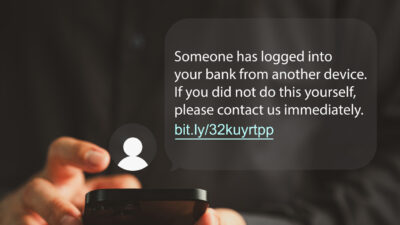
Smishing is a form of phishing that takes place over SMS. Scammers send fraudulent messages that look like they’re from legitimate companies, friends, or even government agencies. These messages often contain a link designed to trick you into clicking it, leading you to malicious websites or prompting you to download malware.
Smishing attacks play on emotions, using urgency or fear to push you to act without thinking. Messages may say things like, “Your account is compromised—click here to secure it,” or “You have an urgent payment due. Click here to avoid fees.” The goal is to make you click the link without questioning its legitimacy.
The Risks of Clicking on Suspicious Links in Texts
Clicking on a link in a smishing text can lead to a variety of harmful outcomes, all of which put your finances, personal information, and device security at risk. Here are the most common dangers associated with these fraudulent links.
1. Data Theft and Identity Theft
One of the primary risks of clicking on a smishing link is data theft. Many scam websites are designed to look like legitimate login pages for banks, retailers, or social media platforms. If you enter your login credentials, payment details, or personal information on these sites, scammers can use this data for identity theft or sell it on the dark web.
Once scammers have access to your information, they can:
- Withdraw funds from your bank account.
- Make purchases using your credit card.
- Open accounts or apply for loans in your name.
- Access your other online accounts if you use the same password.
To protect yourself, avoid entering any personal or financial information on websites accessed through text message links, especially if the message is unsolicited or appears unusual.
2. Malware and Spyware Infections
Some smishing links lead to websites that automatically download malware or spyware onto your device. These malicious programs can compromise your device in a number of ways, including:
- Stealing personal information: Spyware can monitor your keystrokes, track your activity, and send sensitive information (like passwords or banking details) back to the scammer.
- Hijacking your device: Malware can take over functions on your phone, enabling scammers to make unauthorized purchases, send more spam messages, or control your device remotely.
- Installing ransomware: Some malicious links install ransomware, which locks your files and demands payment to unlock them. Ransomware attacks are financially devastating and difficult to recover from.
Modern mobile malware is hard to detect, and once it’s on your device, it can be challenging to remove without expert assistance. Avoiding suspicious links is the best way to prevent these infections.
3. Financial Losses and Fraud
Clicking on a link in a smishing text can lead directly to financial fraud. Scammers may redirect you to fake payment pages, where you’re prompted to enter credit card details or bank account information. Once you’ve submitted this information, scammers can:
- Make unauthorized charges on your accounts.
- Withdraw funds without your permission.
- Use your payment details for online shopping or subscriptions.
Sometimes, scammers will also impersonate customer support for payment apps or online retailers, urging you to “verify your account” to protect it from “suspicious activity.” If you provide payment information on these sites, the scammers have everything they need to steal your money.
4. Loss of Privacy and Personal Information Exposure
Some smishing attacks target specific types of personal information, such as your address, date of birth, or even social security number. Once scammers have this information, they can use it for further fraud, like opening credit accounts in your name or even committing tax fraud.
Beyond financial impacts, privacy loss can have lasting effects, as personal data is often sold to third parties, increasing your vulnerability to future scams and compromising your online privacy. Protecting personal information by never clicking suspicious links is critical to safeguarding your digital privacy.
5. Compromising Contacts and Spreading Scams
When you click on a malicious link, you may inadvertently grant scammers access to your contacts, allowing them to spread the scam further. Some malware can:
- Send scam texts to everyone in your contact list, making it appear as though you’re endorsing the link.
- Collect your contacts’ phone numbers, which can then be targeted in future scams.
- Use your accounts to spread the scam on social media, email, or other messaging platforms.
By compromising your contacts, scammers gain more targets for their attacks and increase the likelihood that someone else will fall for the scam.
6. Account Lockouts and Damage to Reputation
Certain smishing scams will ask you to “confirm” your login credentials, which can give scammers access to your accounts. Once inside, they may:
- Lock you out of your accounts by changing your passwords.
- Post damaging or inappropriate content under your name, harming your reputation.
- Delete important files, messages, or contacts, which can be difficult or impossible to recover.
Losing access to your own accounts can be disruptive and costly, especially if the compromised accounts are connected to your work or finances.
How to Recognize and Avoid Smishing Links
Given the risks, it’s important to recognize and avoid smishing links before clicking on them. Here are some common signs that a link in a text might be part of a smishing attempt:
1. Unusual or Generic Sender Information
Legitimate messages from companies or services typically use official sender names and phone numbers. Scam texts often come from random numbers or generic senders, such as “Customer Support” or “Account Security.”
If the sender’s information seems vague or unusual, consider it a red flag and avoid clicking on any included links.
2. Suspicious URLs or Shortened Links
Scammers often use shortened URLs or URLs that don’t clearly indicate the company name, such as “sec-check.com” or “bit.ly/secureyouraccount.” Be wary of any URL that looks unfamiliar or doesn’t match the official website of the company they claim to represent.
A good rule of thumb is to visit the official website by typing the URL into your browser directly rather than clicking on links in a text.
3. High-Pressure Language
Smishing texts often use urgent or high-pressure language, such as “immediate action required” or “last chance to prevent account suspension.” Legitimate organizations rarely use such tactics in SMS, so treat any message with a pressing deadline or strong emotional language as suspicious.
4. Requests for Personal or Financial Information
A legitimate company will never ask for sensitive information like passwords, PINs, or social security numbers over text. If a message requests this information, it’s almost certainly a scam. Avoid clicking links and delete the message immediately.
What to Do if You’ve Clicked on a Suspicious Link
If you’ve clicked on a suspicious link, taking immediate action can help reduce potential damage. Here’s what to do:
1. Disconnect from the Internet
Turn off Wi-Fi and mobile data on your device to prevent malware from spreading or uploading your data. This helps contain any potential infections and limits further activity on the scammer’s end.
2. Run a Security Scan
Use trusted antivirus software to scan your device for malware or spyware. Many security apps can detect suspicious files and remove them from your device.
3. Change Your Passwords
If you entered login credentials after clicking the link, immediately change passwords for any accounts that could be compromised. Use unique, strong passwords and consider setting up two-factor authentication (2FA) to add an extra layer of security.
4. Monitor Your Financial Accounts
Check your bank and credit card accounts for unauthorized charges. Report any suspicious transactions to your bank or credit card provider to ensure your funds are protected.
5. Report the Scam
Most mobile carriers allow you to forward spam or scam texts to 7726 (SPAM) to report them. Reporting these texts helps carriers track and block known scams, reducing risks for others.
Final Thoughts: Stay Alert and Protect Yourself
The hidden dangers of smishing make it essential to exercise caution with any text message containing a link. By understanding the risks and following best practices for identifying and avoiding suspicious links, you can protect your data, finances, and privacy from scammers. Remember, if you’re ever in doubt, don’t click the link. Verify directly with the company or organization, and take steps to secure your information and stay one step ahead of smishing attacks.